1. Go to mobivox and register there for free account.
2. During registration, remember to insert Victim mobile number in “Phone number
“field as shown below.
3. Complete registration and confirm your email id and then login to your account.
click on “Direct WebCall”.
4. You will arrive at page shown below. In “Enter a number” box, select your country
and also any mobile number(you can enter yours). Now, simply hit on “Call Now”
button to call your friend with his own number.
5. That’s it. Your friend will be shocked to see his own number calling him. I have
spent last two days simply playing this cool mobile hack prank.
Note: This trick will only knowledge purpose…
How To Hack wifi using AndroDumpper [ANDROID]
No Root Method:
thms and AndroDumpper own developed algorithms that makes this application better than others
But it only supports Android 5.0 and up , it only let you connect to the Access Point and keep it saved in your network list , so you can connect to it anytime later , but it doesn’t show the password , since the Wifi Password saved somewhere in your Android Phone which requires Root to show, so if you have Root then you can show the password after connecting using this ( No Root Method ).
Root Method:
it uses some Root Based methods to connect to the network , sometimes it doesnt connect directly to the network , but it brings the Password , because it already has authenticated with the Network , and this supports Android 4.0 and upFor showing password in ( No Root Method ) , and using ( Root Method ) , you need to Root your Android Phone and have BusyBox Installed , and i can’t provide a way to Root your Phone , since every Android vendor has its own way to Root, but you can download and install busybox.


Use Reliance Jio 4G In 3G Phone
1. Open Engineering mode in your phone, if you don’t have download from here:http://goo.gl/Engineeringmode & Install.
2. Open app and Select MTK settings > select preferred network option.
3. You will see list of network. you have to select 4G LTE/WCDMA/GSM and Then Restart your Device.
Get Rs 100 Cashback On First Electricity Bill Payment
Steps to get rs 100 cashback in JioMoney,
- Download JioMoney App (Jio Users)
- Sign In/Sign Up
- Initiate a Electricity bill payment of rs 50 or more and proceed further
- After successful transaction, you’ll get your cashback of rs 100 in next 72 hours
- Cheers!!
Terms & Conditions:
- Cashback applicable for first electricity bill paid using JioMoney app
- Electricity bill must be paid between 23rd to 31st Aug 2016 to be eligible for this offer
- Cashback would be credited within 72hrs of a successful transaction into users JioMoney wallet
- We reserve the right to end this offer at our discretion without any prior notice
List of supported electricity bill providers by JioMoney,
- Andhra Pradesh -SPDC.
- Bihar- BEDCPL – Bhagalpur | IPCL – BodhGay.
- Chhattisgarh– CSE.
- Daman & Diu– Daman & Diu Electricity.
- Dadra & Nagar Haveli– DNH Power.
- Delhi– BSES Rajdhani | BSES Yamuna | TATA Power DDL.
- Jharkand– JUSCO.
- Madhya Pradesh | MPMKVVCL – Bhopal | MPPKVVCL – Indore | MPPKVVCL – Indore Non R-APDRP | MPPKVVCL – Jabalpur.
- Maharashtra– BEST | Reliance Energy (Mumbai) | Mahadiscom (MSEB / MSEDCL).
- Meghalaya– MEPDC.
- Rajasthan– AVVNL – Ajmer | JVVNL – Jaipur | JDVVNL – Jodhpur.
- Telangana– SPDCL.
- Tripura– TSEC.
- Uttar Pradesh– Noida Power Company Ltd.
- West Bengal– CESC Kolkata.
Port Your Number To Jio 4G
1. Send an SMS “PORT Mobile Number” to 1900. You have to send the SMS from the same mobile
number that you want to port to Jio 4G. Normal, SMS Charges Apply.
Example – PORT 9876543210
2. After sending the SMS, you should receive an SMS with UPC (Unique Port Code). The UPC is
valid for 15 Days only. Now, Download MyJio app from Play Store and generate offer code.
3. Visit the Nearest Reliance Digital or Xpress Mini Store or Preferred Jio retailer or prominent
multi-brand Jio stores and fill the customer application form. Also, you will have to submit the
required documents like Aadhar Card, Passport size photo, Address proof. Very soon, Reliance will
be implementing Jio eKYC Signup.
Disabling Media From Auto Downloading in Whatsapp
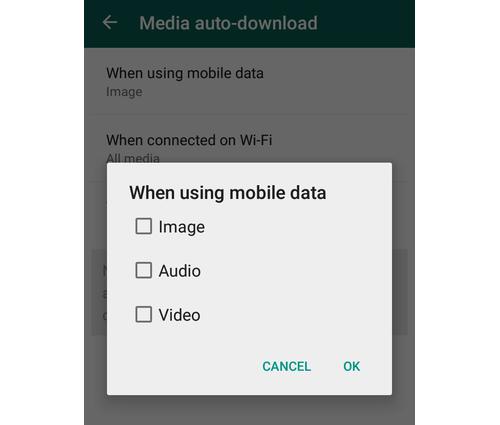
Disabling Media From Auto Downloading - If you don't want your images, audio and video to be auto-downloaded on your phone then just go to Settings > Chat settings > Media auto-download and choose from options provided.
Find out when your message was read in Whatsapp
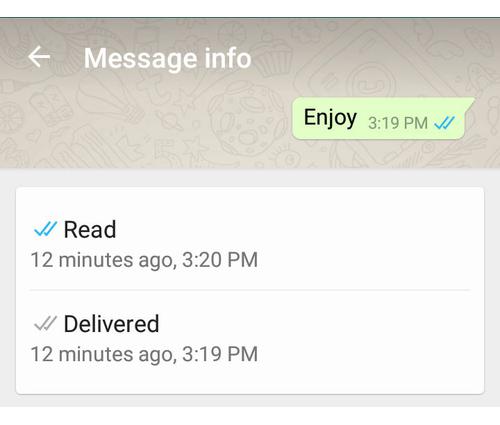
Find out when your message was read - If you want to find out when your message was read then you need to long press on the sent message, and tap on the (i) icon to see the details.
Archive chats in whatsapp
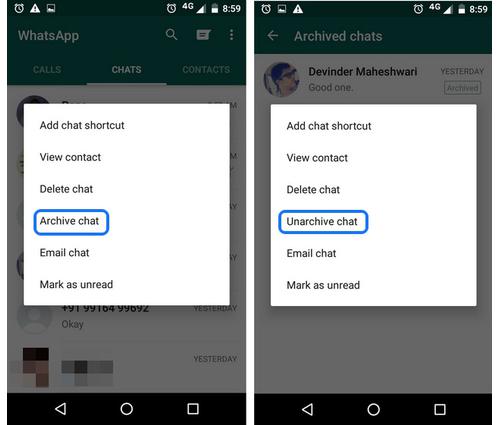
Archive chats - This feature lets you hide conversations from your chats which you can access later. Just long press on a chat you wish to hide, and select Archive chat and vice-versa.
Instant Dictionary and Translator In Google Chrome
This one of the useful Google chrome tips and tricks 2016 I
really like. While reading an article, many times we need the
dictionary to find the meaning of different words. You can
Google it for those word meanings or use a dictionary. But, they
take time and distract you from reading.

In this case you can you two useful extensions; Google

Dictionary and Instant Translate. If your native language is
English, then use Google Translate. But, if you want to
translate a word or phrase to your local language, the Instant
Translate would better.
Enable Guest Browsing in Google Chrome.
Suppose, one of your friends borrow your laptop for browsing,
then he or she could access all information you saved on the
Chrome, like bookmarks, history, passwords, etc. These are
your private and sensational data, that no one should know.
But, don’t worry about it. Chrome allows the users add
multiple user accounts on it. In order to add a new account,
click on Menu >> Settings, and on the “People” section, tick on
“Enable Guest browsing” and click on “Add person” button to
add a new account. In this way, you can prevent others to
access your personal information.
Subscribe to:
Posts (Atom)