DISM vs SFC first? What should I run first on Windows 10?

Should I run SFC or DISM first to repair file or system image corruptions on my Windows 10 computer? Most websites suggest you running one or both of these tools. When should you run each or both? This post tries to explain.
sfc or dism
The System File Checker is integrated with Windows Resource Protection, which protects registry keys and folders as well as critical system files. If any changes are detected to a protected system file, the modified file is restored from a cached copy located in the Windows folder itself.
You can use the DISM Tool or Deployment Imaging and Servicing Management to update the files and correct the problem, if your System File Checker is not working, to fix Windows component store corruption or if a Windows image becomes unserviceable.

Update Windows Defender manually in Windows 10/8/7

Windows Defender in Windows 10 or Windows 8.1 is set to automatically download and install the definition updates using Windows Update, once a day. If for some reason, your Windows Defender will not update automatically, or if you wish to download and save the definition updates in order to maybe update Windows Defender offline, on different installations of Windows 10/8/7/Vista, then this post will be of interest to you.
We have already seen how to download Windows Update manually. Today, we will see how you can update Windows Defender manually in Windows 10, Windows 8.1 and Windows 7. I will also give links for downloading updates for Microsoft Security Essentials in the post..

Update Windows Defender manually

Update Windows Defender manually in Windows
First check whether you are using a 32-bit or 64-bit version of Windows 10/8.1/7. Once you know the version of Windows installed on your device, download the installers from the following links:
  • Download definition updates for Windows Defender in Windows 10, Windows 8.1/8: 32-bit | 64-bit | ARM.
  • Download definition updates for Windows Defender in Windows 7 and Windows Vista: 32-bit | 64-bit.
  • Download definition updates for Microsoft Security Essentials: 32-bit | 64-bit.
Once the file has finished downloading, go to your download location and double-click the file mpam–fe.exe. Follow the prompts to install the update.

How to Enable or Disable CD/DVD ROM (Win XP/Vista/7/8)

How to Enable or Disable CD/DVD ROM (Win XP/Vista/7/8)


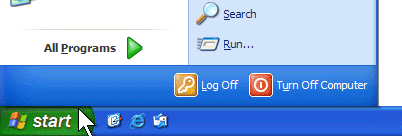
 Click Start, and then click Run.

3
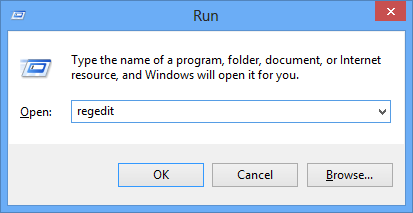
2 In the Open box, type regedit, and then click OK. 4
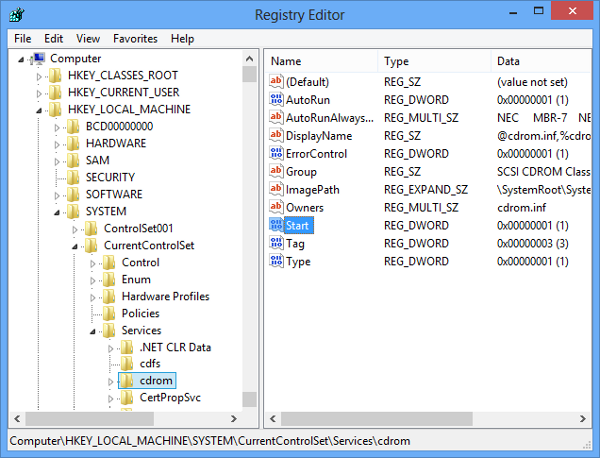
3 Locate, and then click the following registry key: HKEY_LOCAL_MACHINE\SYSTEM\CurrentControlSet\Services\cdrom 5
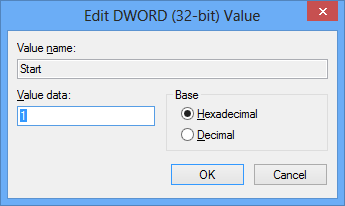
4 In the right pane, double-click Start. Then change the Value data box to 1 in order to enable the CD/DVD-ROM or to 4 to disable. Also make sure that the Hexadecimal checkbox is selected. Finally click OK. 6
5 Restart your PC and check if the CD/DVD-ROM is enabled/disabled accordingly.
Method 2::#
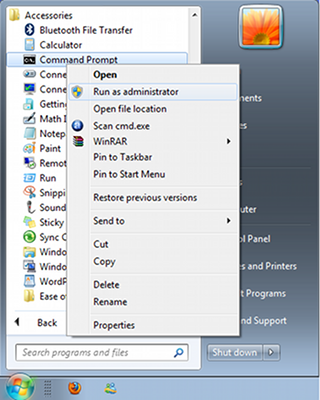
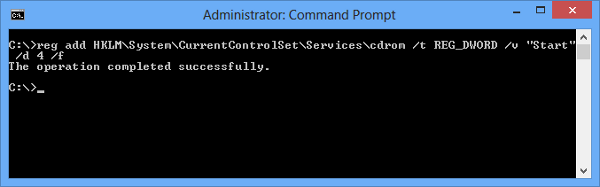
1 Go to Start > All Programs > Accessories, then right click on Command Prompt and select “Run as administrator” 1 2 In the Command Prompt write the following command and press enter: To Enable CD/DVD-Rom:
reg add HKLM\System\CurrentControlSet\Services\cdrom /t REG_DWORD /v "Start" /d 1 /f
To Disable CD/DVD-Rom:
reg add HKLM\System\CurrentControlSet\Services\cdrom /t REG_DWORD /v "Start" /d 4 /f
2
3 Restart your PC and check if the CD/DVD-ROM is enabled/disabled accordingly.

Gaining More Followers in twitter

One of the easiest ways is to follow industry leaders. We’re talking about

influential people like Jeff Bullas, if you’re using Twitter for a marketing

purpose. More importantly, you want to follow people with similar interests. For

example, if you’re in the music industry, you not only want to follow musicians,

but also producers, DJs, etc. These people already have established connections.

So, you want to take a look at who they are following and follow the same

people, while also creating a conversation with them.


Filter Search Results in twitter

Retweet free search result, type: [“name” -rt]

Tweets with links: [“name” -filter:links]

To filter out tweets referencing Twitter name:

[-from:username] – filters out all tweets coming from a user;

[-@username] – filters out all tweets referencing a user.

Wanna know if someone has said something good or bad about you?

[“Your name” :)]

[“Your name” :(]

Question: ?

Location: near:NYC within:5mi

Certain User: from:username

Since a Certain Date: since:2014-01-09

Up to the Same Date: until:2014-01-09

Keyboard Shortcuts for twitter

Navigating Timelines:
  • g then h to go home
  • g then r to go to your replies/mentions
  • g then p to go to your profile
  • g then f to go to your favorites
  • g then m to go to your direct messages
  • g then u then search to view any user’s timeline
Actions for Individual Tweets:
  • f to favorite a tweet
  • r to reply to a tweet
  • t to retweet
  • m to send a direct message
  • n to compose a new tweet

Embed Tweets

Gone are the days of taking a screenshot of a tweet that you want to share on

your blog or website. Save time by easily embedding tweets.

How To Do It:

Select the tweet that you want to share. On the bottom right side of the tweet,

next to ‘Favorite’, you should notice the ‘More’ option. Drop that down and you’ll

see the ‘Embed Tweet’. Click that option and a new screen will appear with a

code that you’ll copy and paste onto your site or blog.

Schedule Tweets

In case you weren’t aware, the best time to tweet is Monday through Thursday

between 9 a.m. and 3 p.m. for most content. So, if you have an interesting piece

of information to share on a Sunday night, it might be better to wait into the

morning. But, what if you forget to send out that juicy tweet? How about

scheduling it?

How To Do It:

While marketers can already do this, you might have to download a program

like TweetDeck, Buffer, LaterBro or Future Tweets to schedule tweets.

Add Multiple Accounts With One Email Address in twitter

If you have a Gmail account, you’re in luck. Gmail has a cool feature which

allows you to alter you address just by adding a dot anywhere in your username.
For example, johnsmith@gmail.com could be john.smith@gmail.com or

j.ohnsmith@gmail.com. The cool part is that all your messages will be sent to

you arrive in your mailbox. Why? Because Google ignores the period. Twitter,

however, doesn’t. To Twitter, this is a completely different address.

Another way to use on email account for different Twitter handles would be by

having the typical @gmail for one account and @googlemail.com for the second.

You could probably do this with alias and domains as well. Or, just forward

everything to Gmail.

Deleting Location in twitter


Go into Settings, then Security. You’ll see a Delete All Location button. This will

remove the location from all of your current and previous tweets.

Best Google Search Alternatives You Can Use

1. DuckDuckGo


2. Bing


3 Yahoo search


4. Yandex


20 Best VLC Media Player Keyboard Shortcuts

1. Full Screen
Windows: F
Mac OS: Command+F

2. Exit Full Screen
Windows: Esc or F
Mac OS: Command+F

3. Pause/Play
Windows: Spacebar
Mac OS: Spacebar

4. Turn on/off Subtitles
Windows: V
Mac OS: S

5. Jump Forward/Backward
Windows: Ctrl+left/Right (short), Alt+Left/Right (Medium), Shift+Left/Right (Long)
Mac OS: Command +Ctrl+left/Right (short), Command+Option+Left/Right (Medium), command+Shift+Left/Right (Long)

6. Control Volume
Windows: Ctrl+ (Up/Down) arrow
Mac OS: Command+Up/Down arrow

7. Mute
Windows: M
Mac OS: Command+Option+Down

8. Open File
Windows: Ctrl+O
Mac OS: Command+O

9. Change Aspect Ratio
Windows: A
Mac OS: A

10. Manage Subtitle delay
 Windows: Decrease “G” and Increase “H”
Mac OS: Decrease “H” and Increase “J”

11. Manage Audio delay
Windows: Decrease “J” and Increase “K”
Mac OS: Decrease “F” and Increase “G”

12. Moves Frame by Frame
Windows: E
Mac OS: E

13. Hide Controls
Windows: Ctrl+H
Mac OS: Command+H

14. Manage Bookmarks
Windows: Ctrl+B
Mac OS: Command+B

15. Open and Save Playlist
Windows: Open “Ctrl+L” and Save “Ctrl+Y”
Mac OS: Open “Command+L” and Save “Command+Y”

16. Play Next or Previous Track List
Windows: Use “N” for next and use “P” for previous
Mac OS: Use “command+Right Arrow Key” for next and for previous “Command+Left Arrow Key”

17. See Playback Time
Windows: Use “T” to see the playback time.
Mac OS: Use “T” to see the playback time.

18. Change Playback Speed
Windows: Increase “+” and Decrease “_”
Mac OS: use command and “+” together for increase playback speed and use command and “-” together to decrease playback speed.

19. Take a Screenshot
Windows: Shift+s
Mac OS: Shift+S

20. Access Effects and Filters Menu
Windows: Ctrl+E

Get Nutritional Information from google

Google is smart enough to show nutritional info for food related searches such

as mango, chocolate candy, etc. The given info includes calories, vitamins, fats,

etc. For example: search queries “banana” or “chocolate cake” produces its

nutritional information.

Get Info about Celebrities and Personalities from google

Google can list various public information about numerous celebrities and

personalities. You’re just a search away from learning something new about

your favorite celebrity. For example, “Mahatma Gandhi height” lists the

height of our Father of the Nation; “bacon number Amitabh Bachchan”

shows the bacon number for Amitabh Bachchan; and “Emma Watson age” tells

the age of the pretty actor of Harry Potter movie series.

Find Songs by Singer or Movie from google

Google can help you find songs by your favorite singer or movie very easily and

conveniently. It lists all the songs in a list and you can click any song to get its

YouTube links and additional information. For example: “songs by Britney”

brings you all the songs sung by Britney Spears; and “avatar songs” lists all the

songs from the Avatar movie.

Get Tourist Spots from GOOGLE

Google can list the tourist attractions for any place in the world if you start your

search starting with the trigger word “attractions“, and then provide name of

the city or the postal code of the location. For example: “attractions New 

Delhi” or “attractions in New Delhi” list the places of attraction in New

Delhi; and “attractions 10001” lists the tourist places in New York.

Get Movies Info from GOOGLE

Google can present the data in various digestible ways, and its best method is its  
Knowledge Graph that can tell information about many things including

movies. For example: “titanic casts” shows the casts info of Titanic; “titanic 

budget” shows its budget information; “titanic characters” shows its

characters and their actual names; and “titanic director” gets you name of its

director, etc.

Know your IP Address from GOOGLE

ip address typed in the search bar shows your current IP address as acquired

by Google. For example: “ip address” lists 1.2.3.4 as my computer’s IP address.

STEPS TO REMOVE SHORTCUT VIRUS USING WINRAR:

  1. Open WinRAR application. (If you don’t have it installed, download it from here)
  2. From inside WinRAR interface, move on to your infected drive. Inside it, you’ll find all your files safe and clearly visible.
  3. Select them all, right click-> Add Files to Archive and choose a name like USB Drive Backup.rar (or anything you like). With this, you’ve created an archive of all the files inside the infected drive.
  4. Open My Computer -> open your infected drive. You’ll find your created archive there. Right click on it -> Cut. Paste it somewhere safe in your hard disk drive.
  5. Open My Computer, Right-click on your infected drive-> Format. Choose Quick Format option and Start. After the format is over, just extract the backed up .rar file back into the removable drive.

STEPS TO REMOVING SHORTCUT VIRUS USING TROJORM REMOVAL TOOL AND FIXFOLDER SCRIPT TOGETHER:

  1. Copy the Trojorm Removal Tool inside the infected drive and run it. (Make sure you copy it by “exploring” the infected drive or the virus will spread out).
  2. Copy the Fixfolder Script to the infected drive, right-click on it and open with Notepad (or your preferred text editor) and change the letter H with the infected drive’s letter. Save the file and run it.

www.mediafire.com/download/bbjbdis05e3gc94/Fixfolder_&_Trojorm_tool.zip”